Integrate Graphify into a Gradle workflow: from Knowledge Graph to PlantUML diagram in one command
Published on 19 April 2026
- The problem: diagrams always lag behind the code
- The solution: a deterministic Knowledge Graph → PlantUML pipeline
- Step 1: Install Graphify and extract the Knowledge Graph
- Step 2: The Gradle plugin transforms the Knowledge Graph into PlantUML
- Step 3: Daily use
- The full pipeline in a Gradle workflow
- Dogfooding: the plugin documents itself
- Why it’s deterministic (and why it matters)
- Diagrams of the pipeline itself
- Integration in project governance
- Setup: checklist in 5 minutes
- Traps and mitigations
- What we get in the end
- Links
Your codebase is growing. Dependencies between modules are multiplying. Architecture documentation becomes obsolete before it’s even written. What if your Gradle build could automatically generate up-to-date diagrams from the actual code structure? That’s exactly what the Graphify + PlantUML Gradle Plugin pipeline does:`graphify . --no-viz`extracts the Knowledge Graph,`./gradlew generateKnowledgeGraphDiagram`transforms it into PlantUML diagrams. Zero LLM, zero manual, 100% deterministic.
- tic
-
[]
The problem: diagrams always lag behind the code
Any project that exceeds a few thousand lines experiences this syndrome:
-
We draw an architecture diagram at the beginning of the project
-
The code evolves, the dependencies change
-
The diagram becomes a decorative lie
-
Nobody updates it because it’s a pain
-
Newcomers rely on it and make mistakes
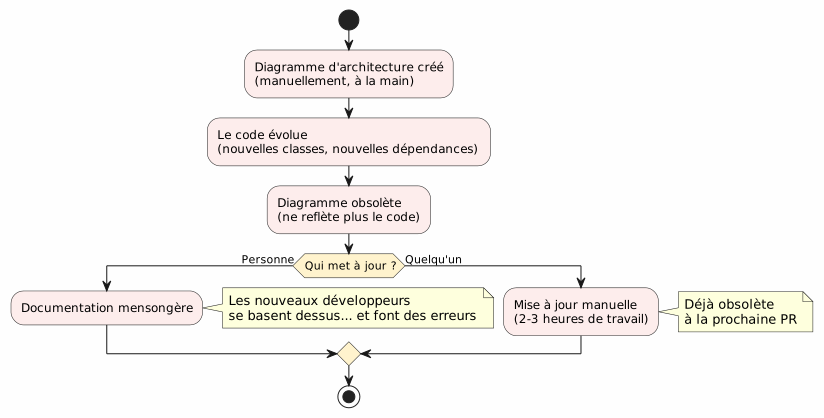
The question is not should we have diagrams? — everyone knows we should. The question is:Who keeps them up to date?
The answer: nobody. Unless it’s automatic.
The solution: a deterministic Knowledge Graph → PlantUML pipeline
The principle is simple: instead of drawing the diagrams by hand, we themgenerates from the real structure of the code.
Failed to generate image: PlantUML preprocessing failed: [From <input> (line 6) ]

@startuml
skinparam backgroundColor #FEFEFE
skinparam componentStyle rectangle

actor Développeur
component "Graphify
^^^^^
 Syntax Error? (Assumed diagram type: sequence)

@startuml
skinparam backgroundColor #FEFEFE
skinparam componentStyle rectangle

actor Développeur
component "Graphify
(pip install graphifyy)" as Graphify
collections "graphify-out/graph.json\n(Knowledge Graph)" as KGJSON
component "PlantUML Gradle Plugin
(generateKnowledgeGraphDiagram)" as Plugin
component "KnowledgeGraphParser" as Parser
component "KnowledgeGraphRenderer" as Renderer
component "PlantumlService
(validation + PNG rendering)" as PS
collections "diagrams/knowledge-graph/
(.puml + .png)" as Output

Développeur --> Graphify : graphify . --no-viz
Graphify --> KGJSON : extrait la structure\ndu code source
Développeur --> Plugin : ./gradlew generateKnowledgeGraphDiagram
Plugin --> Parser : parse(graph.json)
Parser --> Plugin : KnowledgeGraph\n(noeuds + arêtes + communautés)
Plugin --> Renderer : render(graph, filters)
Renderer --> Plugin : code PlantUML\ndéterministe
Plugin --> PS : validateSyntax + generateImage
PS --> Output : .puml + .png

note bottom of Plugin
  Pipeline DÉTERMINISTE
  Aucun appel LLM
  Résultat reproductible
end note

@enduml
Two commands. That’s all.
# Étape 1 : extraire le Knowledge Graph
graphify . --no-viz

# Étape 2 : générer les diagrammes PlantUML
./gradlew generateKnowledgeGraphDiagram
The result? Files`.puml` et .png`in`diagrams/knowledge-graph/, versioned in Git, always up to date with the code.
Step 1: Install Graphify and extract the Knowledge Graph
Installation
Graphify is a Python tool that analyzes your codebase and builds a structured knowledge graph:
# Méthode recommandée
uv tool install graphifyy && graphify install --platform opencode

# Alternative avec pip
pip install graphifyy && graphify install --platform opencode
Configure Exclusions
Create a file`.graphifyignore`at the root of the project to exclude files that are not part of the business logic:
# Secrets — JAMAIS dans le graphe
*-context.yml
*.env

# Fichiers générés
build/
.gradle/

# Tests fonctionnels
src/functionalTest/
Extract the Knowledge Graph
graphify . --no-vizThe flag`--no-viz`skips HTML generation (unnecessary in a Gradle pipeline). The result is a file`graphify-out/graph.json`containing:
-
Knots: classes, functions, files — with their type and community
-
edgesrelations between nodes (EXTRACTED from the code, INFERRED by the LLM)
-
Communities: automatic groupings of linked nodes
{
  "nodes": [
    {"id": "0", "label": "LlmService", "file_type": "code", "community": 0},
    {"id": "1", "label": "ApiKeyPool", "file_type": "code", "community": 0},
    {"id": "2", "label": "PlantumlService", "file_type": "code", "community": 1}
  ],
  "links": [
    {"source": "1", "target": "0", "relation": "uses", "confidence": "EXTRACTED", "weight": 0.9},
    {"source": "0", "target": "2", "relation": "calls", "confidence": "INFERRED", "weight": 0.7}
  ]
}|
The source code ( |
Step 2: The Gradle plugin transforms the Knowledge Graph into PlantUML
Pipeline architecture
The plugin`com.cheroliv.plantuml`integrates a task`generateKnowledgeGraphDiagram`who transforms`graph.json`in PlantUML diagrams in a mannercompletely deterministic :
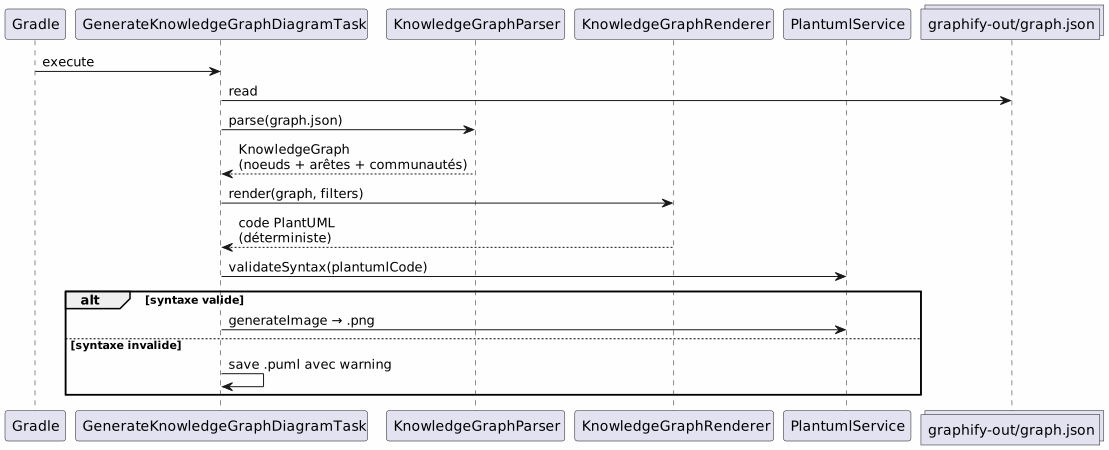
The internal components
| Component | Role |
|---|---|
|
Parse`graph.json`— supports 3 formats: graphify native ( |
|
Deterministically transforms a`KnowledgeGraph`in PlantUML code. Groups by type, communities in packages, automatic legend. |
|
Gradle task orchestrating: parse → render → validate → PNG. Configurable via Gradle properties. |
|
Data models:`KnowledgeGraph`, |
|
Syntax validation + PNG rendering (reused by all tasks of the plugin). |
Rendering rules
The renderer applies deterministic visual conventions:
| Edge type | PlantUML notation | Significance |
|---|---|---|
EXTRACTED |
|
Extracted relation from source code (certainty) |
inferred |
|
Relation inferred by the LLM (confidence score) |
AMBIGUOUS |
|
Ambiguous relation (to be verified) |
Communities are rendered as PlantUML packages with an automatic color palette.
Step 3: Daily use
Complete diagram
# Générer le diagramme du Knowledge Graph complet
./gradlew generateKnowledgeGraphDiagramOutput:`diagrams/knowledge-graph/knowledge-graph-full.puml`+.png
Filter by community
# Une seule communauté
./gradlew generateKnowledgeGraphDiagram \
  -Pplantuml.kg.community=community_0

# Limiter le nombre de noeuds (lisibilité)
./gradlew generateKnowledgeGraphDiagram \
  -Pplantuml.kg.community=community_0 \
  -Pplantuml.kg.maxNodes=15
Filter by edge type
# Uniquement les relations certaines (EXTRACTED)
./gradlew generateKnowledgeGraphDiagram \
  -Pplantuml.kg.edgeTypes=EXTRACTED

# Relations certaines + inférées
./gradlew generateKnowledgeGraphDiagram \
  -Pplantuml.kg.edgeTypes=EXTRACTED,INFERRED
Filter by node type and confidence
# Uniquement les classes de code
./gradlew generateKnowledgeGraphDiagram \
  -Pplantuml.kg.nodeTypes=code

# Seuil de confiance minimum (pour les INFERRED)
./gradlew generateKnowledgeGraphDiagram \
  -Pplantuml.kg.minConfidence=0.7
Custom output directory
./gradlew generateKnowledgeGraphDiagram \
  -Pplantuml.kg.outputDir=docs/architecture
Complete reference of properties
| Property | Default | Description |
|---|---|---|
|
(all) |
Filter communities by name (substring match) |
|
(all) |
Edge types separated by commas:`EXTRACTED`, |
|
|
Minimum confidence threshold for the edges |
|
(unlimited) |
Maximum number of nodes to display |
|
(all) |
Types of nodes separated by commas (e.g. |
|
|
Output directory for the files`.puml` et |
The full pipeline in a Gradle workflow
Workflow type
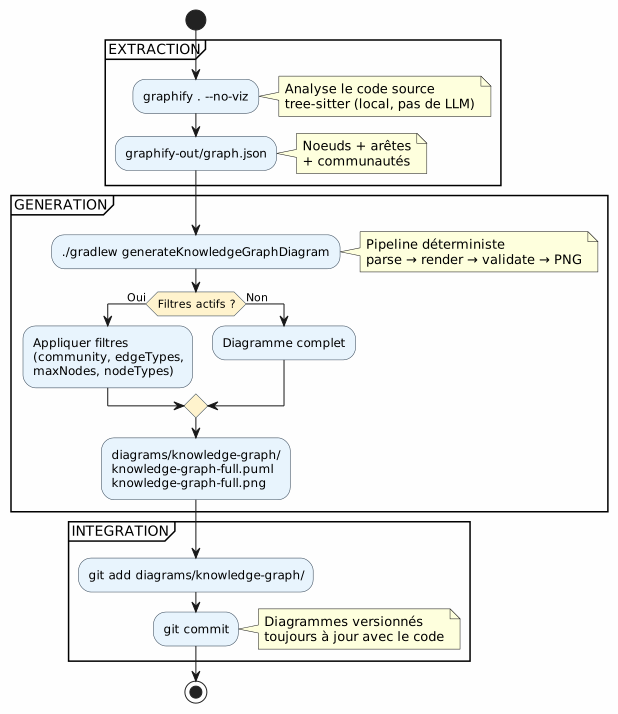
Integration into the development cycle
The pipeline naturally integrates into the key steps of development:
Failed to generate image: PlantUML preprocessing failed: [From <input> (line 6) ]

@startuml
skinparam backgroundColor #FEFEFE

state "Development" as dev
state "Extraction\ngraphify . --no-viz" as extract
state "Generation
^^^^^
 Syntax Error? (Assumed diagram type: state)

@startuml
skinparam backgroundColor #FEFEFE

state "Development" as dev
state "Extraction\ngraphify . --no-viz" as extract
state "Generation
./gradlew generateKnowledgeGraphDiagram" as generate
state "Commit
versioned diagrams" as commit

[*] --> dev
dev --> extract : Code modifié
extract --> generate : graph.json à jour
generate --> commit : .puml + .png générés
commit --> dev : Diagrammes dans le repo

note right of extract
  Quasi instantané sur du code Kotlin
  (tree-sitter, pas de LLM)
end note

note right of generate
  Déterministe
  Pas de LLM
  Résultat reproductible
end note

@enduml
Incremental update
When the code changes, we don’t rebuild the entire graph from scratch:
# Mise à jour incrémentale (fichiers modifiés uniquement)
graphify . --update

# Puis régénérer les diagrammes
./gradlew generateKnowledgeGraphDiagram|
|
Dogfooding: the plugin documents itself
The PlantUML plugin exists to transform prompts into diagrams. It can also transform the Knowledge Graph of its own codebase into documentation diagrams. This is dogfooding: the plugin consumes its own service.
Failed to generate image: PlantUML preprocessing failed: [From <input> (line 16) ]

@startuml
skinparam backgroundColor #FEFEFE
skinparam componentStyle rectangle

package "Normal pipeline\n(user → diagrams)" as normal {
    [Fichier .prompt] as prompt
    [LlmService\n+ ApiKeyPool] as llm1
    [ProcessPlantumlPromptsTask] as task1
    [Diagramme PNG] as out1

    prompt --> task1
    task1 --> llm1
    llm1 --> out1
}

package "Pipeline Knowledge Graph
^^^^^
 Syntax Error? (Assumed diagram type: component)

@startuml
skinparam backgroundColor #FEFEFE
skinparam componentStyle rectangle

package "Normal pipeline\n(user → diagrams)" as normal {
    [Fichier .prompt] as prompt
    [LlmService\n+ ApiKeyPool] as llm1
    [ProcessPlantumlPromptsTask] as task1
    [Diagramme PNG] as out1

    prompt --> task1
    task1 --> llm1
    llm1 --> out1
}

package "Pipeline Knowledge Graph
(deterministic, no LLM)" as kg {
    [graphify-out/graph.json] as kgjson
    [KnowledgeGraphParser] as parser
    [KnowledgeGraphRenderer] as renderer
    [PlantumlService] as ps
    [Diagramme PNG\n(documentation du plugin)] as out2

    kgjson --> parser
    parser --> renderer
    renderer --> ps
    ps --> out2
}

package "Pipeline Dogfooding\n(LLM → plugin documentation)" as dogfood {
    [GraphifyPromptAdapter] as gpa
    [Fichiers .prompt\nauto-générés] as auto_prompt
    [LlmService\n+ ApiKeyPool] as llm2
    [ProcessPlantumlPromptsTask] as task2
    [Diagramme PNG\n(documentation LLM)] as out3

    kgjson --> gpa
    gpa --> auto_prompt
    auto_prompt --> task2
    task2 --> llm2
    llm2 --> out3
}

note "Same LlmService, same ApiKeyPool,
same PlantumlService
— ZERO duplication" as N

@enduml
Associated Gradle tasks:
| Task | LLM ? | Description |
|---|---|---|
|
No |
Transform`graph.json`in PlantUML (deterministic) |
|
Yes |
Generate des? Wait, we need to preserve fragment. French "Génère des" (imperative) meaning "Generate some". The English fragment: "Generate some". Usually translation: "Generate some". Let’s output that. |
# Documentation déterministe (rapide, pas de LLM)
./gradlew generateKnowledgeGraphDiagram

# Documentation LLM (plus riche, consomme des tokens)
./gradlew generateDiagramDocs
Why it’s deterministic (and why it matters)
The key point of the pipeline`generateKnowledgeGraphDiagram` : He does not call any LLM. The transformation`graph.json`→ PlantUML is a pure function.
Failed to generate image: PlantUML preprocessing failed: [From <input> (line 6) ]

@startuml
skinparam backgroundColor #FEFEFE
skinparam componentStyle rectangle

rectangle "Deterministic Pipeline
(generateKnowledgeGraphDiagram)" as det {
^^^^^
 Syntax Error? (Assumed diagram type: activity)

@startuml
skinparam backgroundColor #FEFEFE
skinparam componentStyle rectangle

rectangle "Deterministic Pipeline
(generateKnowledgeGraphDiagram)" as det {
    [graph.json] as json
    [KnowledgeGraphParser] as parser
    [KnowledgeGraphRenderer] as renderer
    [PlantUML code] as puml

    json --> parser : parse
    parser --> renderer : KnowledgeGraph
    renderer --> puml : render (fonction pure)
}

rectangle "Pipeline LLM
(processPlantumlPrompts)" as llm {
    [.prompt] as prompt
    [LlmService] as llmSvc
    [ChatModel] as model
    [PlantUML code] as puml2

    prompt --> llmSvc
    llmSvc --> model : API call
    model --> puml2 : réponse non-déterministe
}

note bottom of det
  Même entrée → même sortie
  Pas de latence réseau
  Pas de coût en tokens
  Reproductible en CI
end note

note bottom of llm
  Même entrée → sortie variable
  Latence réseau (1-5s)
  Coût en tokens
  Nécessite une clave API
end note

@enduml
The concrete advantages:
| Advantage | Impact |
|---|---|
Reproducibility |
Even`graph.json`→ same diagram. Exactly. Every time. |
Zero cost |
No LLM call = no tokens = no API invoice. |
Zero latency |
Parse + render takes ~100ms, not 1-5 seconds. |
CI-compatible |
No API key needed. No flaky test due to a variable LLM response. |
versionable |
Le |
Diagrams of the pipeline itself
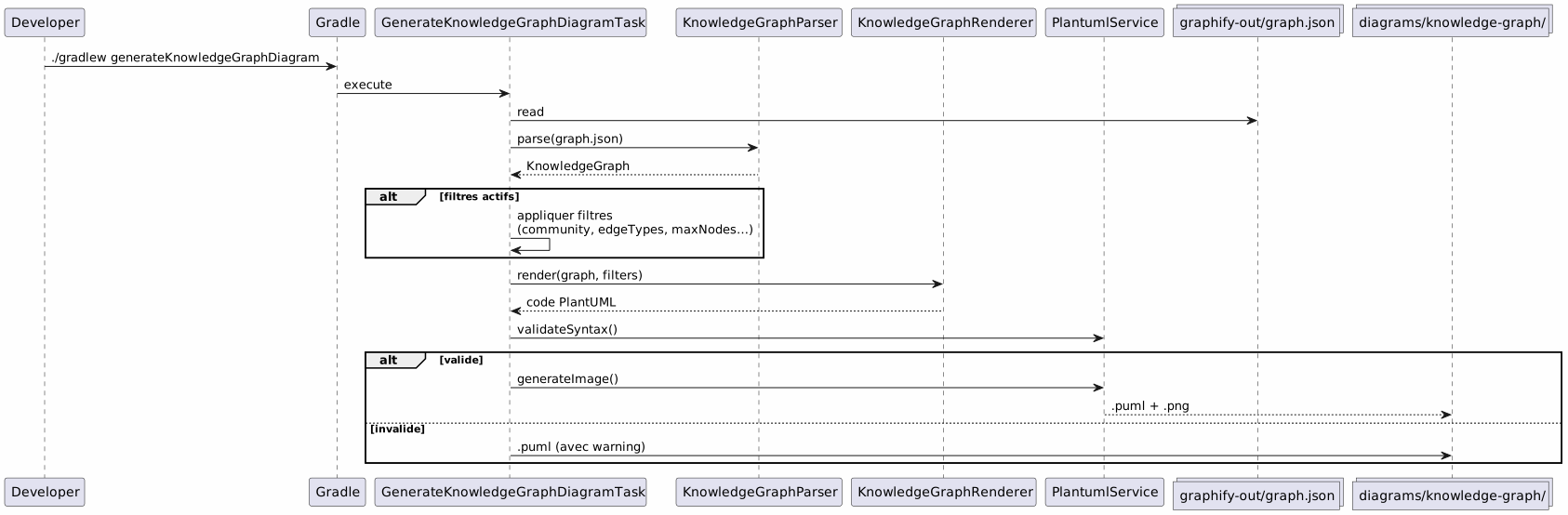
To close the loop, here is the pipeline diagram as it would be generated by the plugin:
Integration in project governance
In our project, this pipeline integrates into an EAGER/LAZY context management strategy for the AI agent. The Knowledge Graph replaces manual architecture documentation with a structured, queryable, and automatically updated graph.
Failed to generate image: PlantUML preprocessing failed: [From <input> (line 21) ]

@startuml
skinparam backgroundColor #FEFEFE
skinparam componentStyle rectangle

package "EAGER\n(always charged)" as eager {
    [PROMPT_REPRISE.adoc\n(contexte session)] as pr
    [INDEX.adoc\n(vue d'ensemble)] as idx
    [GRAPH_REPORT.adoc\n(~50 lignes)] as gr
}

package "LAZY — Strategy\n(on request)" as lazy_strat {
    [Méthodologies] as meth
    [Archives sessions] as sessions
}

package "LAZY — Graphify\n(targeted queries)" as lazy_graph {
    [graph.json] as gj
    [Queries\n(query/path/explain)] as queries
}

package "Pipeline PlantUML
^^^^^
 Syntax Error? (Assumed diagram type: component)

@startuml
skinparam backgroundColor #FEFEFE
skinparam componentStyle rectangle

package "EAGER\n(always charged)" as eager {
    [PROMPT_REPRISE.adoc\n(contexte session)] as pr
    [INDEX.adoc\n(vue d'ensemble)] as idx
    [GRAPH_REPORT.adoc\n(~50 lignes)] as gr
}

package "LAZY — Strategy\n(on request)" as lazy_strat {
    [Méthodologies] as meth
    [Archives sessions] as sessions
}

package "LAZY — Graphify\n(targeted queries)" as lazy_graph {
    [graph.json] as gj
    [Queries\n(query/path/explain)] as queries
}

package "Pipeline PlantUML
(auto-generated)" as puml {
    [generateKnowledgeGraphDiagram] as kgTask
    [generateDiagramDocs] as ddTask
    [Diagrammes PNG] as diagrams
}

Agent --> eager : Lit en début de session
Agent ..> lazy_strat : Charge si type détecté
Agent ..> lazy_graph : Query si besoin structurel
kgTask --> diagrams : Déterministe
ddTask --> diagrams : Via LLM

note right of gr
  Condensé du Knowledge Graph
  God nodes + communautés
  Remplace ECOSYSTEM_OVERVIEW
  (225 lignes → 50 lignes)
end note

@enduml
The marriage of the two systems is complementary:
-
The strategy manages the WHEN and the HOW— governance, workflow, archiving
-
Graphify manages the WHAT and the WHERE— code structure, relations, targeted queries
_ The session strategy manages theWHEN et le how(governance, workflow, thresholds), Graphify manages theWHAT et le where(code structure, relationships, targeted queries). The PlantUML pipeline manages theWITH WHAT(deterministic diagrams, versioned, always up-to-date). _
Setup: checklist in 5 minutes
| # | step | Order |
|---|---|---|
1 |
Install Graphify |
|
2 |
Configure exclusions |
Create`.graphifyignore` |
3 |
Extract the Knowledge Graph |
|
4 |
Generate the diagrams |
|
5 |
Commit the results |
|
# Script complet en 5 commandes
uv tool install graphifyy
cat > .graphifyignore << 'EOF'
*-context.yml
*.env
build/
.gradle/
EOF
graphify . --no-viz
./gradlew generateKnowledgeGraphDiagram
git add graphify-out/GRAPH_REPORT.adoc graphify-out/graph.json diagrams/knowledge-graph/
Traps and mitigations
| Trap | Description | Mitigation |
|---|---|---|
Graph too dense |
A large project generates hundreds of unreadable nodes |
Use`-Pplantuml.kg.maxNodes=30`and filter by community |
Exclusions too broad |
Too many files in`.graphifyignore`reduces the value of the graph |
Start by only excluding credentials and build |
Direction of the arrows |
INFERRED edges may have an ambiguous direction |
Filter by`-Pplantuml.kg.edgeTypes=EXTRACTED`for certain relationships only |
Obsolete graph |
The code changes but the graph is not rebuilt |
Use`graphify . --update`regularly or the git hook`graphify hook install` |
Updated cost |
Incremental updates are almost free (local tree-sitter) |
Only the docs ( |
What we get in the end
Failed to generate image: PlantUML preprocessing failed: [From <input> (line 6) ]

@startuml
skinparam backgroundColor #FEFEFE

rectangle "BEFORE" as avant {
    card "Hand-drawn diagrams
Always outdated
^^^^^
 Syntax Error? (Assumed diagram type: activity)

@startuml
skinparam backgroundColor #FEFEFE

rectangle "BEFORE" as avant {
    card "Hand-drawn diagrams
Always outdated
Nobody updates them" as av1 #FDEDEC
}

rectangle "after" as apres {
    card "Automatically generated diagrams
Always up to date with the code
Versioned in Git
Deterministic and reproducible" as ap1 #E8F8E8
}

avant --> apres : graphify . --no-viz\n+ ./gradlew generateKnowledgeGraphDiagram

@enduml
The concrete benefits :
| Profit | Detail |
|---|---|
Always up-to-date documentation |
The diagrams reflect the current code, not a manual snapshot |
Zero maintenance effort |
The diagrams regenerate at each build |
Technical debt reduction |
No longer need to maintain diagrams by hand |
Visual context for the new |
A new developer understands the architecture by looking at the diagrams |
Potential fine-tuning |
Pairs (subgraph → diagram) are examples of AI training |
Automatic validation |
`PlantumlService.validateSyntax()`checks each generated diagram |
Rapid onboarding |
5 diagrams = full view of the architecture view |
_ He who has a _why can bear all the hows. __
The why : always up-to-date diagrams. The how : two commands in a Gradle pipeline.
Links
-
The super tips of the fg command— previous article on the terminal workflow