CI/CD Python – 第三部分:使用 Poetry、Docker 和高级发布深入学习
Publié le 19 July 2025
在这系列的前两部分中,我们有: - 建立了一个可用于 Python 应用的 CI/CD 流水线,使用 GitHub Actions 和 PyPI。 - 已将此流水线工业化,使用多版本测试、通过 Test PyPI 进行渐进式发布,并配备质量和安全工具。
在这第三部分,我们将会去超越在 PyPI 上的简单发布为了构建一个完整、健壮且专业的 CI/CD 流水线,配有: - 诗歌为了现代化的包装和依赖的优化管理。 - Docker为了创建可重复且跨平台的构建。 - 条件发布用于处理诸如候选发布版之类的场景。 - 自动化工具(Renovate, Dependabot) 轻松保持管道最新。
与 Poetry 集成
Poetry 通过集中管理依赖和构建,取代了旧的打包工具(setup.py, requirements.txt)pyproject.toml.
安装 Poetry
# Installer Poetry
curl -sSL https://install.python-poetry.org | python3 -
# Vérifier la version
poetry --version
项目初始化
# Initialiser un nouveau projet avec Poetry
poetry init
# Suivre l'assistant pour renseigner : nom, version, description, licence, dépendances.
这会生成一个文件`pyproject.toml` :
[tool.poetry]
name = "playlist-downloader"
version = "0.1.0"
description = "CLI tool for managing YouTube playlists"
authors = ["Christophe Hérolivier <[email protected]>"]

[tool.poetry.dependencies]
python = ">=3.8"
typer = "^0.9.0"
yt-dlp = "^2023.7.6"
google-api-python-client = "^2.0.0"
google-auth-oauthlib = "^1.0.0"

[tool.poetry.group.dev.dependencies]
pytest = "^7.0"
mypy = "^1.0"
bandit = "^1.7"
safety = "^2.3"
black = "^23.0"
ruff = "^0.1"
�添加和安装依赖
poetry add typer yt-dlp google-api-python-client google-auth-oauthlib
poetry add --group dev pytest mypy black bandit safety ruff
使用 Poetry 进行发布
Poetry 原生管理发布:
# Publication sur Test PyPI
poetry publish --build --repository test-pypi

# Publication sur PyPI
poetry publish --build此命令会自动使用存在于…中的信息`pyproject.toml`.
可复现的 Docker 构建
为确保在开发、CI/CD 和生产环境中实现一致的执行,Docker 与 Poetry 完全集成。
Dockerfile 示例
FROM python:3.11-slim

WORKDIR /app
COPY pyproject.toml poetry.lock ./
RUN pip install poetry
RUN poetry install --no-root --only main

COPY . .

CMD ["poetry", "run", "python", "cli.py"]
这确保: - 一个固定的 Python 环境。 - 已锁定的依赖项通过`poetry.lock`. - 可在所有支持 Docker 的系统上运行的可执行镜像。
在 GitHub Actions 中的集成
name: Docker Build

on:
  push:
    branches: [main]

jobs:
  build-docker:
    runs-on: ubuntu-latest
    steps:
      - uses: actions/checkout@v4
      - name: Build Docker image
        run: docker build -t ghcr.io/${{ github.repository }}:latest .
      - name: Push Docker image
        run: docker push ghcr.io/${{ github.repository }}:latest
条件发布
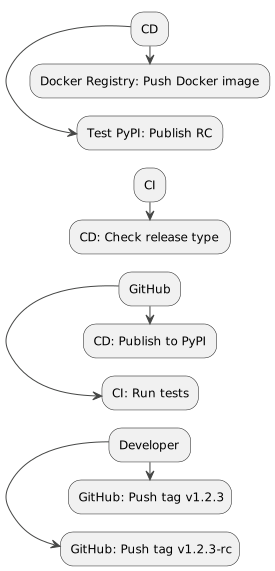
在专业流水线中,必须能够仅在某些情况下发布: - 发布候选版本至 Test PyPI 将稳定版本发布到 PyPI。 - 仅触发的 Docker 构建用于`main`。
- name: Publish to Test PyPI
  if: contains(github.ref, '-rc')
  run: poetry publish --build --repository test-pypi

- name: Publish to PyPI
  if: startsWith(github.ref, 'refs/tags/v')
  run: poetry publish --build
这种方法可以避免意外发布。
使用 Renovate 和 Dependabot 自动化依赖
为了防止您的依赖变得过时,请集成自动更新工具。
Dependabot
version: 2
updates:
  - package-ecosystem: "pip"
    directory: "/"
    schedule:
      interval: "weekly"
  - package-ecosystem: "github-actions"
    directory: "/"
    schedule:
      interval: "weekly"
Dependabot 每周创建 PR 以更新 Python 和 GitHub Actions 依赖。
翻新
{
  "extends": ["config:base"],
  "packageRules": [
    {
      "matchManagers": ["pip"],
      "groupName": "python-dependencies",
      "schedule": ["before 6am on monday"]
    }
  ]
}
Renovate 允许进行更细粒度的控制:依赖分组、调度以及高级规则。
PlantUML 图表
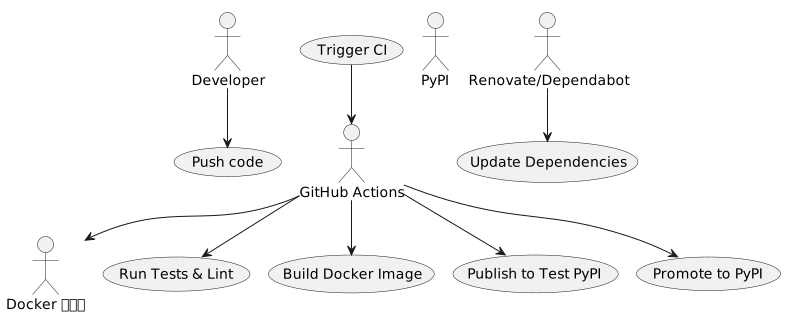
用例 – 高级 CI/CD
序列 – 有条件发布
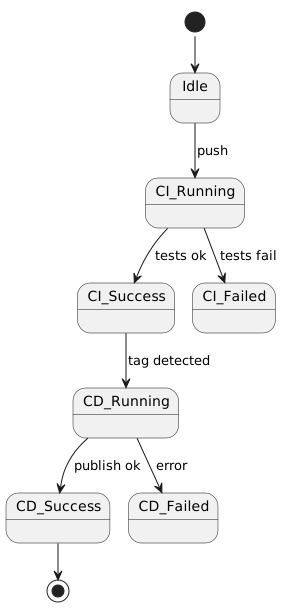
状态 – CI/CD 管道
部署 – CI/CD 架构
结论
在这第三部分中,我们了解了如何: - 使用 Poetry 现代化 Python 包装。 - 通过Docker确保构建可重现。 - 设置条件性发布. 自动化依赖项的更新。
您现在拥有了一个 CI/CD 管道完整、工业化和安全, 准备好随着您的项目发展。