使用 Thymeleaf 的 JBake 静态站点国际化
Publié le 20 October 2025
介�绍
静态网站的国际化(i18n)乍看起来可能很复杂,但JBake结合Thymeleaf提供了创建多语言站点的优雅解决方案。在本文中,我将展示我如何在我的博客上实现i18n,涵盖模板和多语言文章管理。
用例图 (Use Case)
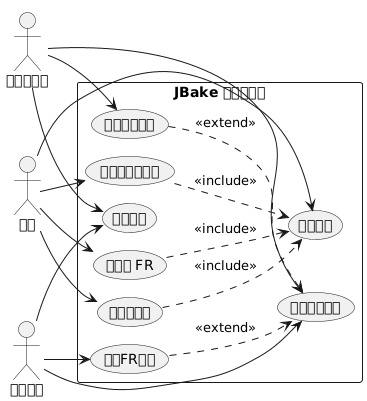
国际化架构
我们的方法基于两个支柱:
-
模板的国际化: 使用 Thymeleaf 消息文件用于界面元素
-
内容的 i18n按语言组织文章,放置在专用的文件夹结构中
结构图(文件组织)
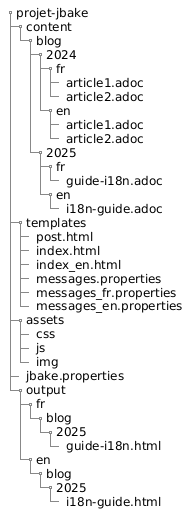
为什么采用这种方法?
这种分离可以:
-
保持界面一致性,无论语言如何
-
独立管理文章的内容和翻译
-
简化添加新语言,无需进行大规模重构
-
允许仅在特定语言中可用的文章
组件图
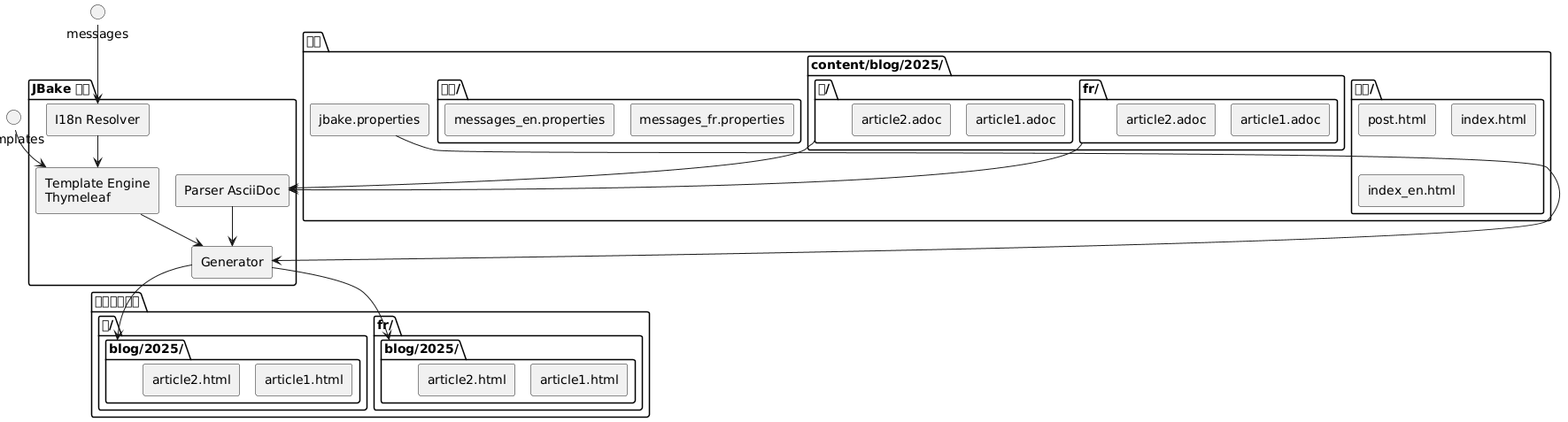
Thymeleaf 模板国际化
消息文件的结构
第一步是为每种支持的语言创建属性文件:
src/jbake/templates/
├── messages.properties        # Fallback par défaut
├── messages_fr.properties     # Français
├── messages_en.properties     # Anglais
└── messages_de.properties     # Allemand
消息文件的内容
这是一个文件示例`messages_fr.properties`:
# Navigation
nav.home=Accueil
nav.blog=Blog
nav.about=À propos
nav.contact=Contact

# Articles
article.readmore=Lire la suite
article.published=Publié le
article.tags=Étiquettes
article.also.available=Également disponible en

# Interface
site.title=Mon Blog Technique
site.description=Partage de connaissances et expériences
footer.copyright=© 2025 Tous droits réservés
search.placeholder=Rechercher un article...
以及其英语等价`messages_en.properties`:
# Navigation
nav.home=Home
nav.blog=Blog
nav.about=About
nav.contact=Contact

# Articles
article.readmore=Read more
article.published=Published on
article.tags=Tags
article.also.available=Also available in

# Interface
site.title=My Tech Blog
site.description=Sharing knowledge and experiences
footer.copyright=© 2025 All rights reserved
search.placeholder=Search articles...
在模板中使用
在您的Thymeleaf模板中,使用语法`#{}`要访问消息 :
<!DOCTYPE html>
<html xmlns:th="http://www.thymeleaf.org">
<head>
    <title th:text="#{site.title}">Mon Blog</title>
    <meta name="description" th:content="#{site.description}" />
</head>
<body>
    <nav>
        <a th:href="@{/}" th:text="#{nav.home}">Accueil</a>
        <a th:href="@{/blog/}" th:text="#{nav.blog}">Blog</a>
        <a th:href="@{/about.html}" th:text="#{nav.about}">À propos</a>
    </nav>

    <footer>
        <p th:text="#{footer.copyright}">Copyright</p>
    </footer>
</body>
</html>
时序图 - 国际化解决方案
Failed to generate image: PlantUML preprocessing failed: [From <input> (line 4) ]

@startuml
actor Auteur
participant JBake
participant "AsciiDoc
^^^^^
 Syntax Error? (Assumed diagram type: sequence)

@startuml
actor Auteur
participant JBake
participant "AsciiDoc
解析器" as parser
participant "Thymeleaf\n引擎" as thymeleaf
participant "I18n
解析器" as i18n
database "messages_*.properties" as messages

Auteur -> JBake: jbake -b
activate JBake

JBake -> parser: Lire article.fr.adoc
activate parser
parser --> JBake: Contenu + métadonnées\n(lang=fr, article-id=xyz)
deactivate parser

JBake -> parser: Lire article.en.adoc
activate parser
parser --> JBake: Contenu + métadonnées\n(lang=en, article-id=xyz)
deactivate parser

JBake -> thymeleaf: Générer page FR
activate thymeleaf

thymeleaf -> i18n: Résoudre #{nav.home}
activate i18n
i18n -> messages: Lire messages_fr.properties
messages --> i18n: "首页"
i18n --> thymeleaf: "首页"
deactivate i18n

thymeleaf -> JBake: Rechercher traductions\n(article-id=xyz, lang!=fr)
JBake --> thymeleaf: article.en.html trouvé

thymeleaf --> JBake: /fr/blog/article.html
deactivate thymeleaf

JBake -> thymeleaf: Générer page EN
activate thymeleaf

thymeleaf -> i18n: Résoudre #{nav.home}
activate i18n
i18n -> messages: Lire messages_en.properties
messages --> i18n: "首页"
i18n --> thymeleaf: "首页"
deactivate i18n

thymeleaf -> JBake: Rechercher traductions\n(article-id=xyz, lang!=en)
JBake --> thymeleaf: article.fr.html trouvé

thymeleaf --> JBake: /en/blog/article.html
deactivate thymeleaf

JBake --> Auteur: Site généré
deactivate JBake
@enduml
JBake 的语言环境配置
在您的文件中`jbake.properties`, 设置默认语言环境 :
# Locale par défaut
thymeleaf.locale=fr

# Encodage
template.encoding=UTF-8
文章国际化:按文件夹组织
流程图 (Flow) - 生成
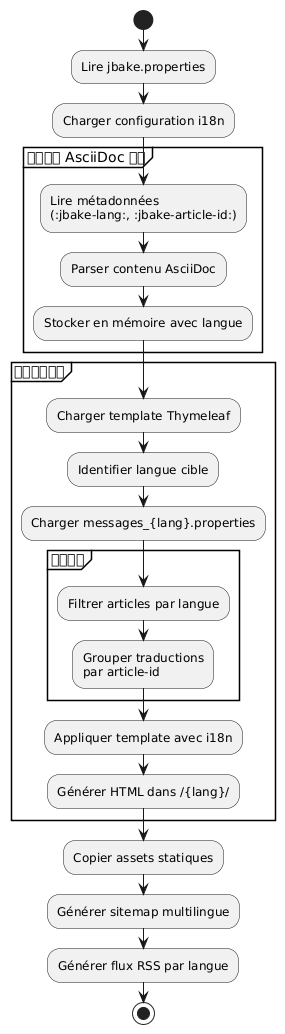
文件夹结构
与其在文件名中使用后缀,我选择了按文件夹组织的方式,这样更清晰且易于维护:
content/blog/
├── 2024/
│   ├── fr/
│   │   ├── introduction-jbake.adoc
│   │   ├── guide-thymeleaf.adoc
│   │   └── astuces-asciidoc.adoc
│   └── en/
│       ├── introduction-jbake.adoc
│       ├── thymeleaf-guide.adoc
│       └── asciidoc-tips.adoc
└── 2025/
    ├── fr/
    │   └── internationalisation-jbake.adoc
    └── en/
        └── jbake-internationalization.adoc
这种方法的优势
这种结构具有多个优势:
-
清晰的分离: 每种语言都有自己的空间
-
灵活命名: 文件可以根据语言具有不同的名称
-
可扩展性: 容易添加一种新语言
-
自然组织: 遵循 JBake 的时间逻辑
文章的元数据
每篇文章都必须包含元数据以允许翻译之间的链接。以下是一个示例:
法文版(2025/fr/internationalisation-jbake.adoc) :
= Internationalisation d'un site statique JBake
:jbake-type: post
:jbake-status: published
:jbake-date: 2025-10-20
:jbake-lang: fr
:jbake-article-id: jbake-i18n-thymeleaf
:jbake-tags: jbake, thymeleaf, i18n
:jbake-description: Guide pour mettre en place l'i18n avec JBake英文版本(2025/en/jbake-internationalization.adoc) :
= Internationalizing a JBake Static Site
:jbake-type: post
:jbake-status: published
:jbake-date: 2025-10-20
:jbake-lang: en
:jbake-article-id: jbake-i18n-thymeleaf
:jbake-tags: jbake, thymeleaf, i18n
:jbake-description: Guide to implement i18n with JBake
注意:该属性`:jbake-article-id:`至关重要:它能够将同一篇文章的不同译文关联起来。
URL 配置
在`jbake.properties`, 配置 URL 模式以包含语言 :
# Pattern d'URL avec langue
post.permalink.pattern=:lang/blog/:year/:name.html

# Langue par défaut
site.default.lang=fr
这将生成如下形式的 URL:
-
/fr/blog/2025/internationalisation-jbake.html -
/en/blog/2025/jbake-internationalization.html
多语言显示模板
带有语言选择器的文章模板
创建一个模板`post.html`显示可用翻译:
<!DOCTYPE html>
<html xmlns:th="http://www.thymeleaf.org">
<head>
    <title th:text="${content.title}">Article</title>
</head>
<body>
    <article>
        <header>
            <h1 th:text="${content.title}">Titre</h1>

            <div class="article-meta">
                <time th:text="${#dates.format(content.date, 'dd MMMM yyyy')}"
                      th:attr="datetime=${#dates.format(content.date, 'yyyy-MM-dd')}">
                    Date
                </time>

                <!-- Sélecteur de traductions -->
                <div class="translations" th:if="${content['article-id']}">
                    <span th:text="#{article.also.available}">Aussi disponible en :</span>
                    <ul class="language-list">
                        <li th:each="post : ${published_posts}"
                            th:if="${post['article-id'] == content['article-id'] and post.lang != content.lang}">
                            <a th:href="${post.uri}"
                               th:text="${post.lang.toUpperCase()}">
                                LANG
                            </a>
                        </li>
                    </ul>
                </div>
            </div>
        </header>

        <div class="content" th:utext="${content.body}">
            Contenu de l'article
        </div>

        <footer class="article-footer">
            <div class="tags" th:if="${content.tags}">
                <span th:text="#{article.tags}">Étiquettes :</span>
                <span th:each="tag : ${content.tags}">
                    <a th:href="@{/tags/{tag}.html(tag=${tag})}"
                       th:text="${tag}">tag</a>
                </span>
            </div>
        </footer>
    </article>
</body>
</html>
按语言过滤的索引
为每种语言创建索引模板:
index.html(法文索引) :
<!DOCTYPE html>
<html xmlns:th="http://www.thymeleaf.org">
<head>
    <title th:text="#{site.title}">Mon Blog</title>
</head>
<body>
    <main>
        <h1 th:text="#{nav.blog}">Blog</h1>

        <div class="articles-list">
            <article th:each="post : ${published_posts}"
                     th:if="${post.lang == 'fr'}">
                <h2>
                    <a th:href="${post.uri}" th:text="${post.title}">Titre</a>
                </h2>
                <time th:text="${#dates.format(post.date, 'dd MMMM yyyy')}">
                    Date
                </time>
                <p th:text="${post.description}">Description</p>
                <a th:href="${post.uri}" th:text="#{article.readmore}">
                    Lire la suite
                </a>
            </article>
        </div>
    </main>
</body>
</html>index_en.html(英文索引) :
<!DOCTYPE html>
<html xmlns:th="http://www.thymeleaf.org">
<head>
    <title th:text="#{site.title}">My Blog</title>
</head>
<body>
    <main>
        <h1 th:text="#{nav.blog}">Blog</h1>

        <div class="articles-list">
            <article th:each="post : ${published_posts}"
                     th:if="${post.lang == 'en'}">
                <h2>
                    <a th:href="${post.uri}" th:text="${post.title}">Title</a>
                </h2>
                <time th:text="${#dates.format(post.date, 'dd MMMM yyyy')}">
                    Date
                </time>
                <p th:text="${post.description}">Description</p>
                <a th:href="${post.uri}" th:text="#{article.readmore}">
                    Read more
                </a>
            </article>
        </div>
    </main>
</body>
</html>
语言之间的导航
全局语言选择器
流程图 - 用户读取
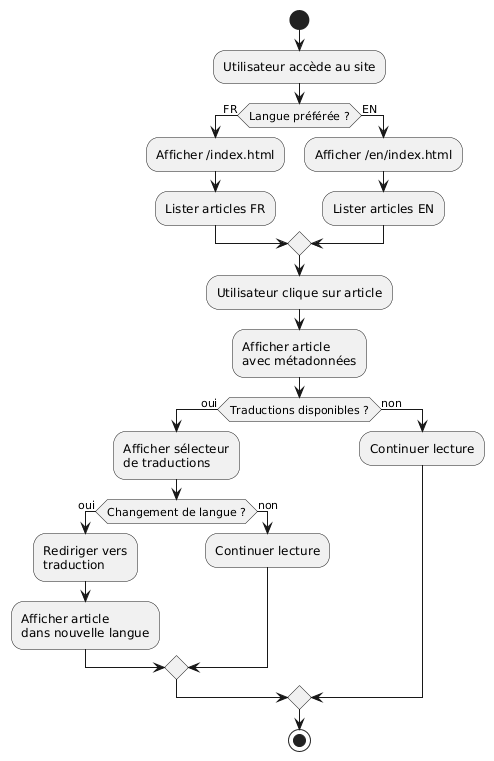
在你的主模板中添加语言选择器:
<nav class="language-switcher">
    <a href="/index.html"
       th:classappend="${content.lang == 'fr'} ? 'active'"
       title="Français">
        🇫🇷 FR
    </a>
    <a href="/en/index.html"
       th:classappend="${content.lang == 'en'} ? 'active'"
       title="English">
        🇬🇧 EN
    </a>
</nav>
选择器的 CSS 样式
.language-switcher {
    display: flex;
    gap: 1rem;
    padding: 0.5rem;
    background: #f5f5f5;
    border-radius: 4px;
}

.language-switcher a {
    padding: 0.5rem 1rem;
    text-decoration: none;
    color: #333;
    border-radius: 4px;
    transition: background 0.2s;
}

.language-switcher a:hover {
    background: #e0e0e0;
}

.language-switcher a.active {
    background: #007bff;
    color: white;
}

.translations {
    margin: 1rem 0;
    padding: 1rem;
    background: #f8f9fa;
    border-left: 4px solid #007bff;
}

.language-list {
    display: inline-flex;
    gap: 0.5rem;
    list-style: none;
    padding: 0;
    margin: 0;
}

.language-list li::after {
    content: "•";
    margin-left: 0.5rem;
}

.language-list li:last-child::after {
    content: "";
}
按语言的 RSS 订阅
要获得按语言分离的 RSS 源,请创建单独的模板:
feed.xml(法语流) :
<?xml version="1.0" encoding="UTF-8"?>
<rss version="2.0" xmlns:th="http://www.thymeleaf.org">
    <channel>
        <title th:text="#{site.title}">Mon Blog</title>
        <link th:text="${config.site_host}">http://example.com</link>
        <description th:text="#{site.description}">Description</description>
        <language>fr</language>

        <item th:each="post : ${published_posts}"
              th:if="${post.lang == 'fr'}">
            <title th:text="${post.title}">Titre</title>
            <link th:text="${config.site_host + post.uri}">Lien</link>
            <pubDate th:text="${#dates.format(post.date, 'EEE, dd MMM yyyy HH:mm:ss Z')}">
                Date
            </pubDate>
            <description th:text="${post.description}">Description</description>
        </item>
    </channel>
</rss>
良好实践和技巧
1. 文章标识符的一致性
请确保`:jbake-article-id:`对于同一文章的所有翻译都是相同的。 请使用一致的格式:
-
请使用英文标识符以实现通用性
-
使用短横线来分隔单词
-
避免使用特殊字符
2. 日期一致
一篇文章的所有翻译必须有相同的出版日期`:jbake-date:`). 这有助于排序和按时间顺序显示。
3. 多语言标签
对于标签,您有两种选择:
选项1:通用英文标签
:jbake-tags: java, spring-boot, microservices选项 2:使用映射翻译的标签
# Version française
:jbake-tags: java, spring-boot, microservices

# Version anglaise
:jbake-tags: java, spring-boot, microservices
4. 未翻译项目的管理
不需要翻译所有文章。如果某篇文章只存在于一种语言中,它将不会出现在另一种语言的列表中。
5. 多语言站点地图
生成一个包含所有语言的站点地图:
<?xml version="1.0" encoding="UTF-8"?>
<urlset xmlns="http://www.sitemaps.org/schemas/sitemap/0.9"
        xmlns:xhtml="http://www.w3.org/1999/xhtml"
        xmlns:th="http://www.thymeleaf.org">
    <url th:each="post : ${published_posts}">
        <loc th:text="${config.site_host + post.uri}">URL</loc>
        <lastmod th:text="${#dates.format(post.date, 'yyyy-MM-dd')}">Date</lastmod>

        <!-- Liens alternatifs pour les traductions -->
        <xhtml:link th:each="translation : ${published_posts}"
                    th:if="${translation['article-id'] == post['article-id'] and translation.lang != post.lang}"
                    rel="alternate"
                    th:attr="hreflang=${translation.lang},href=${config.site_host + translation.uri}" />
    </url>
</urlset>
结论
使用 Thymeleaf 对 JBake 站点进行国际化是一种健壮且可维护的方法。通过将 i18n 与模板分离(通过消息文件)以及将内容的 i18n 通过目录组织来分离,您可以获得一个灵活、易于演进的系统。
要点如下:
-
Thymeleaf 消息文件对于用户界面
-
按文件夹组织(年/语言) 用于文章
-
文章标识符用于链接翻译
-
专用模板对于每种语言
-
显式 URL包含语言代码
部署图
Failed to generate image: PlantUML preprocessing failed: [From <input> (line 15) ]

@startuml
node "开发机器" {
  artifact "来源" {
    folder "content/"
    folder "模板/"
    folder "资产/"
  }

  component "JBake 命令行界面" as jbake

  Sources --> jbake : jbake -b
}

node "构建服务器\n(CI/CD)" {
  component "GitHub Actions
^^^^^
 Syntax Error? (Assumed diagram type: component)

@startuml
node "开发机器" {
  artifact "来源" {
    folder "content/"
    folder "模板/"
    folder "资产/"
  }

  component "JBake 命令行界面" as jbake

  Sources --> jbake : jbake -b
}

node "构建服务器\n(CI/CD)" {
  component "GitHub Actions
或 GitLab CI" as ci

  jbake --> ci : push
}

cloud "CDN / 托管" {
  node "静态Web服务器" {
    artifact "已生成的网站" {
      folder "/fr/blog/"
      folder "/en/blog/"
      folder "/assets/"
    }
  }
}

ci --> "已生成的网站" : déploiement

actor "读者" as users

users --> "静态Web服务器" : HTTPS
@enduml
这种架构让您可以简单地使用两种语言开始,并且可以在不进行大规模重构的情况下添加更多语言。整个系统保持完全静态且高性能,忠实于JBake的理念。
祝您多语言开发顺利!🌍