Parte 2 : Industrializzare e proteggere un pipeline CI/CD Python avanzato
Publié le 18 July 2025
- Introduzione
- Architettura del pipeline CI/CD
- Struttura del Progetto
- Configurazione del Package con pyproject.toml
- Workflow di CI/CD - Test e Qualità
- Flusso di lavoro di rilascio e distribuzione
- Diagrammi di architettura
- Oggetti e modelli della pipeline
- Configurazione dei Segreti
- Scripts di sviluppo locale
- Buone Pratiche e Raccomandazioni
- Monitoraggio e Osservabilità
- Conclusione
- risorse complementari
Introduzione
Nella prima parte di questa serie, abbiamo costruito un pipeline CI/CD semplice ma efficace per automatizzare i test e la pubblicazione di un pacchetto Python su PyPI.
Ora è il momento di professionalizzare questo pipeline. In questa seconda parte, faremo :
-
Migrare verso lo standard moderno pyproject.toml,
-
Aggiungere strumenti di qualità e sicurezza (Black, Mypy, Bandit, Safety)
-
Impostare test multi-versione,
-
Integrare una distribuzione progressiva tramite Test PyPI,
-
Automatizzare il versioning e migliorare il monitoraggio del pipeline.
Preparati a passare da una pipeline funzionante a un’infrastruttura CI/CD professionale.
Distribuire un’applicazione Python su PyPI richiede un pipeline CI/CD robusto che automatizza i test, la costruzione e la pubblicazione dei pacchetti. Questo articolo descrive la configurazione di un pipeline completo utilizzando GitHub Actions per un’applicazione CLI Python, basandosi sulle migliori pratiche dell’ecosistema Python moderno.
Architettura del pipeline CI/CD
Il pipeline che costruiremo segue un approccio in più fasi:
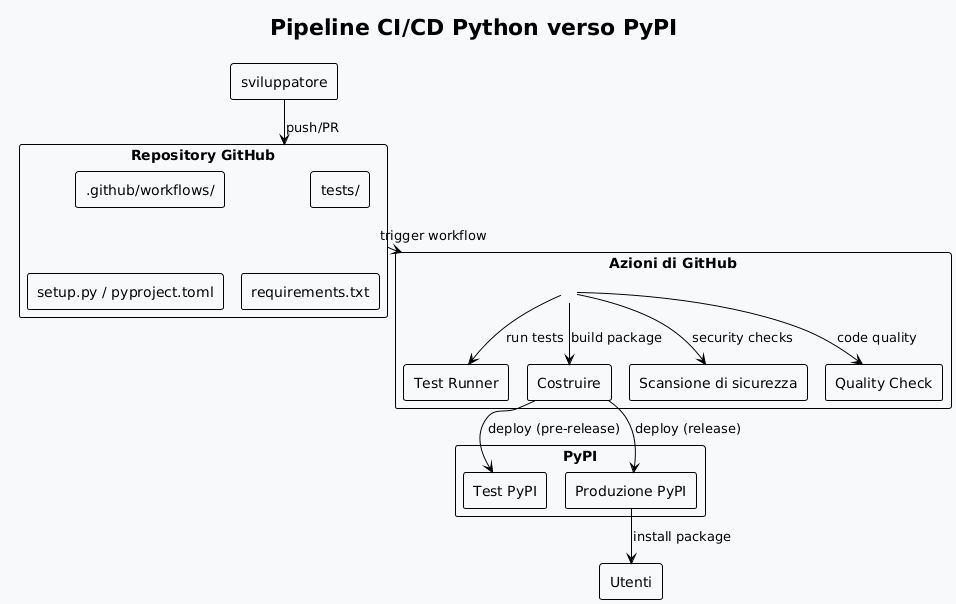
Struttura del Progetto
Un’applicazione CLI Python pronta per la distribuzione deve rispettare una struttura standardizzata:
playlist-downloader/
├── .github/
│   └── workflows/
│       ├── ci.yml
│       ├── release.yml
│       └── security.yml
├── src/
│   └── playlist_downloader/
│       ├── __init__.py
│       ├── cli.py
│       ├── core/
│       └── adapters/
├── tests/
│   ├── unit/
│   ├── integration/
│   └── conftest.py
├── docs/
├── pyproject.toml
├── requirements.txt
├── requirements-dev.txt
├── MANIFEST.in
├── README.md
├── LICENSE
└── CHANGELOG.md
Configurazione del Package con pyproject.toml
Il file`pyproject.toml`è lo standard moderno per configurare i pacchetti Python :
[build-system]
requires = ["setuptools>=45", "wheel", "setuptools_scm>=6.2"]
build-backend = "setuptools.build_meta"

[project]
name = "playlist-downloader"
authors = [
    {name = "Christophe Hérolivier", email = "[email protected]"},
]
description = "CLI tool for YouTube playlist management"
readme = "README.md"
requires-python = ">=3.8"
keywords = ["youtube", "playlist", "cli", "downloader"]
license = {text = "MIT"}
classifiers = [
    "Development Status :: 4 - Beta",
    "Environment :: Console",
    "Intended Audience :: End Users/Desktop",
    "License :: OSI Approved :: MIT License",
    "Operating System :: OS Independent",
    "Programming Language :: Python :: 3",
    "Programming Language :: Python :: 3.8",
    "Programming Language :: Python :: 3.9",
    "Programming Language :: Python :: 3.10",
    "Programming Language :: Python :: 3.11",
    "Topic :: Multimedia :: Sound/Audio",
    "Topic :: Utilities",
]
dependencies = [
    "typer>=0.9.0",
    "yt-dlp>=2023.7.6",
    "google-api-python-client>=2.0.0",
    "google-auth-oauthlib>=1.0.0",
    "pyyaml>=6.0",
    "rich>=13.0.0",
]
dynamic = ["version"]

[project.optional-dependencies]
dev = [
    "pytest>=7.0.0",
    "pytest-cov>=4.0.0",
    "pytest-mock>=3.10.0",
    "black>=23.0.0",
    "flake8>=6.0.0",
    "mypy>=1.0.0",
    "pre-commit>=3.0.0",
    "tox>=4.0.0",
]
test = [
    "pytest>=7.0.0",
    "pytest-cov>=4.0.0",
    "pytest-mock>=3.10.0",
]

[project.urls]
Homepage = "https://github.com/cheroliv/playlist-downloader"
Documentation = "https://github.com/cheroliv/playlist-downloader#readme"
Repository = "https://github.com/cheroliv/playlist-downloader.git"
"Bug Tracker" = "https://github.com/cheroliv/playlist-downloader/issues"

[project.scripts]
playlist-downloader = "playlist_downloader.cli:main"

[tool.setuptools_scm]
write_to = "src/playlist_downloader/_version.py"

[tool.setuptools.packages.find]
where = ["src"]

[tool.pytest.ini_options]
testpaths = ["tests"]
python_files = ["test_*.py"]
python_classes = ["Test*"]
python_functions = ["test_*"]
addopts = [
    "--cov=src/playlist_downloader",
    "--cov-report=html",
    "--cov-report=term-missing",
    "--cov-fail-under=85",
]

[tool.black]
line-length = 88
target-version = ['py38']
include = '\.pyi?$'
extend-exclude = '''
/(
  \.eggs
  | \.git
  | \.hg
  | \.mypy_cache
  | \.tox
  | \.venv
  | _build
  | buck-out
  | build
  | dist
)/
'''

[tool.mypy]
python_version = "3.8"
warn_return_any = true
warn_unused_configs = true
disallow_untyped_defs = true
disallow_incomplete_defs = true
check_untyped_defs = true
disallow_untyped_decorators = true
no_implicit_optional = true
warn_redundant_casts = true
warn_unused_ignores = true
warn_no_return = true
warn_unreachable = true
strict_equality = true

[[tool.mypy.overrides]]
module = [
    "yt_dlp.*",
    "googleapiclient.*",
    "google_auth_oauthlib.*",
]
ignore_missing_imports = true
Workflow di CI/CD - Test e Qualità
Il flusso di lavoro principale (ci.yml) esegue i test su più versioni di Python:
name: CI

on:
  push:
    branches: [ main, develop ]
  pull_request:
    branches: [ main ]

jobs:
  test:
    runs-on: ubuntu-latest
    strategy:
      matrix:
        python-version: ["3.8", "3.9", "3.10", "3.11"]

    steps:
    - uses: actions/checkout@v4
      with:
        fetch-depth: 0

    - name: Set up Python ${{ matrix.python-version }}
      uses: actions/setup-python@v4
      with:
        python-version: ${{ matrix.python-version }}

    - name: Cache dependencies
      uses: actions/cache@v3
      with:
        path: |
          ~/.cache/pip
          ~/.cache/pre-commit
        key: ${{ runner.os }}-pip-${{ hashFiles('**/requirements*.txt') }}
        restore-keys: |
          ${{ runner.os }}-pip-

    - name: Install dependencies
      run: |
        python -m pip install --upgrade pip
        pip install -e ".[dev]"

    - name: Lint with flake8
      run: |
        flake8 src tests --count --select=E9,F63,F7,F82 --show-source --statistics
        flake8 src tests --count --exit-zero --max-complexity=10 --max-line-length=88 --statistics

    - name: Check code formatting with Black
      run: black --check src tests

    - name: Type checking with mypy
      run: mypy src

    - name: Run tests with pytest
      run: |
        pytest tests/ -v --cov=src/playlist_downloader \
          --cov-report=xml --cov-report=term-missing

    - name: Upload coverage to Codecov
      uses: codecov/codecov-action@v3
      if: matrix.python-version == '3.11'
      with:
        file: ./coverage.xml
        flags: unittests
        name: codecov-umbrella

  security:
    runs-on: ubuntu-latest
    steps:
    - uses: actions/checkout@v4

    - name: Set up Python
      uses: actions/setup-python@v4
      with:
        python-version: "3.11"

    - name: Install dependencies
      run: |
        python -m pip install --upgrade pip
        pip install bandit[toml] safety

    - name: Run security checks with bandit
      run: bandit -r src/ -f json -o bandit-report.json

    - name: Check dependencies with safety
      run: safety check --json --output safety-report.json

    - name: Upload security reports
      uses: actions/upload-artifact@v3
      if: always()
      with:
        name: security-reports
        path: |
          bandit-report.json
          safety-report.json

  build:
    needs: [test, security]
    runs-on: ubuntu-latest
    steps:
    - uses: actions/checkout@v4
      with:
        fetch-depth: 0

    - name: Set up Python
      uses: actions/setup-python@v4
      with:
        python-version: "3.11"

    - name: Install build dependencies
      run: |
        python -m pip install --upgrade pip
        pip install build twine

    - name: Build package
      run: python -m build

    - name: Check package with twine
      run: twine check dist/*

    - name: Upload build artifacts
      uses: actions/upload-artifact@v3
      with:
        name: dist
        path: dist/
Flusso di lavoro di rilascio e distribuzione
Il workflow di rilascio (release.yml) gestisce la pubblicazione automatica su PyPI :
name: Release

on:
  push:
    tags:
      - 'v*.*.*'
  workflow_dispatch:
    inputs:
      environment:
        description: 'Deployment environment'
        required: true
        default: 'test'
        type: choice
        options:
        - test
        - production

env:
  PYTHON_VERSION: "3.11"

jobs:
  release:
    runs-on: ubuntu-latest
    environment:
      name: ${{ github.event.inputs.environment || (startsWith(github.ref, 'refs/tags/') && 'production' || 'test') }}

    steps:
    - uses: actions/checkout@v4
      with:
        fetch-depth: 0

    - name: Set up Python
      uses: actions/setup-python@v4
      with:
        python-version: ${{ env.PYTHON_VERSION }}

    - name: Install dependencies
      run: |
        python -m pip install --upgrade pip
        pip install build twine

    - name: Build package
      run: python -m build

    - name: Check package
      run: twine check dist/*

    - name: Publish to Test PyPI
      if: github.event.inputs.environment == 'test' || (startsWith(github.ref, 'refs/tags/') && contains(github.ref, 'rc'))
      env:
        TWINE_USERNAME: __token__
        TWINE_PASSWORD: ${{ secrets.TEST_PYPI_API_TOKEN }}
      run: |
        twine upload --repository testpypi dist/*

    - name: Publish to PyPI
      if: github.event.inputs.environment == 'production' || (startsWith(github.ref, 'refs/tags/') && !contains(github.ref, 'rc'))
      env:
        TWINE_USERNAME: __token__
        TWINE_PASSWORD: ${{ secrets.PYPI_API_TOKEN }}
      run: |
        twine upload dist/*

    - name: Create GitHub Release
      if: startsWith(github.ref, 'refs/tags/')
      uses: actions/create-release@v1
      env:
        GITHUB_TOKEN: ${{ secrets.GITHUB_TOKEN }}
      with:
        tag_name: ${{ github.ref }}
        release_name: Release ${{ github.ref }}
        draft: false
        prerelease: ${{ contains(github.ref, 'rc') }}

  post-release:
    needs: release
    runs-on: ubuntu-latest
    if: startsWith(github.ref, 'refs/tags/')

    steps:
    - uses: actions/checkout@v4

    - name: Set up Python
      uses: actions/setup-python@v4
      with:
        python-version: ${{ env.PYTHON_VERSION }}

    - name: Test installation from PyPI
      run: |
        sleep 60  # Attendre la propagation sur PyPI
        pip install playlist-downloader
        playlist-downloader --version

    - name: Update documentation
      run: |
        # Script pour mettre à jour la documentation
        echo "Documentation updated for version ${GITHUB_REF#refs/tags/}"
Diagrammi di architettura
Diagramma di sequenza - processo di rilascio
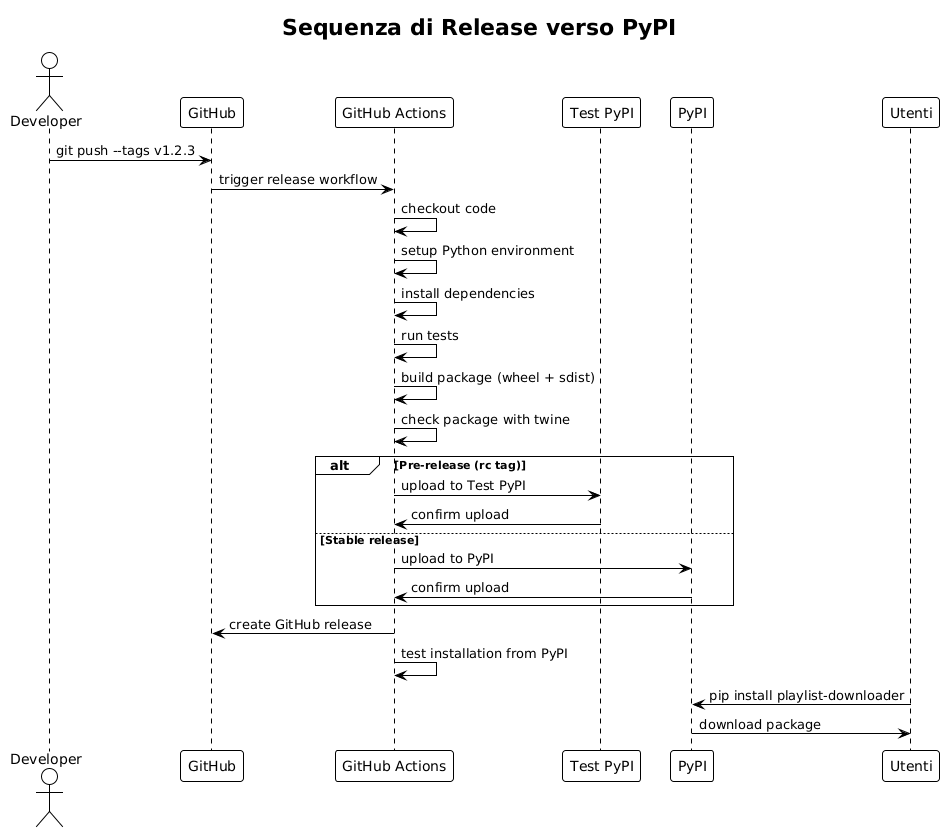
Diagramma degli Stati - Ciclo di Vita del Pacchetto
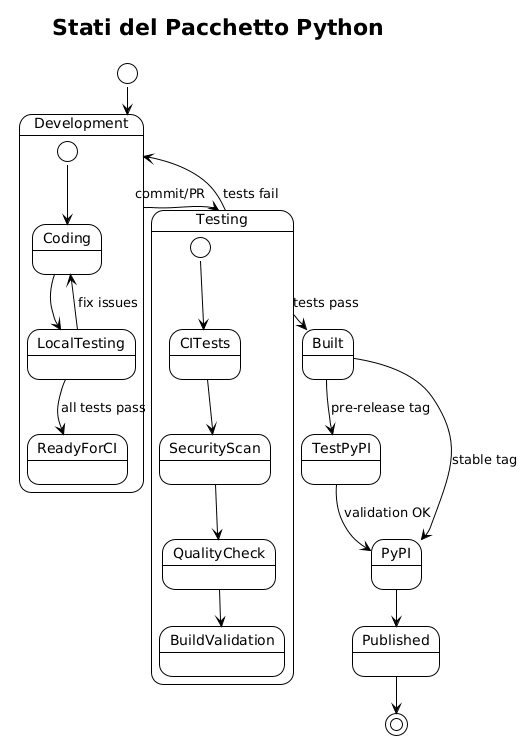
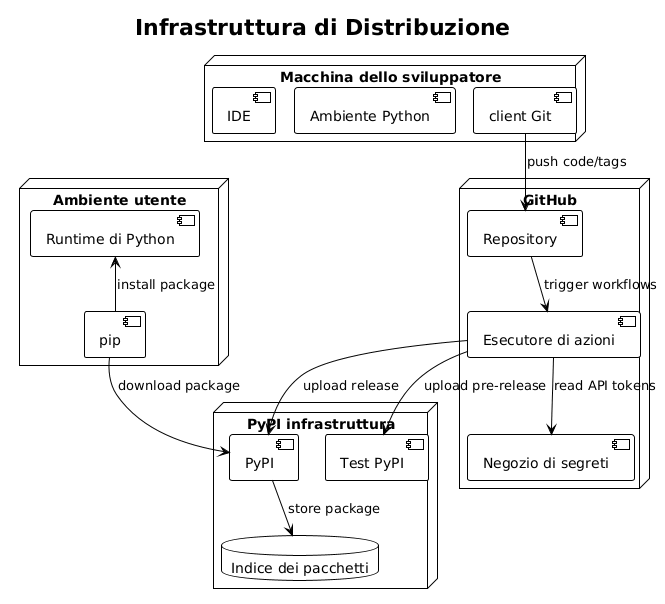
Diagramma di Distribuzione - Infrastruttura CI/CD
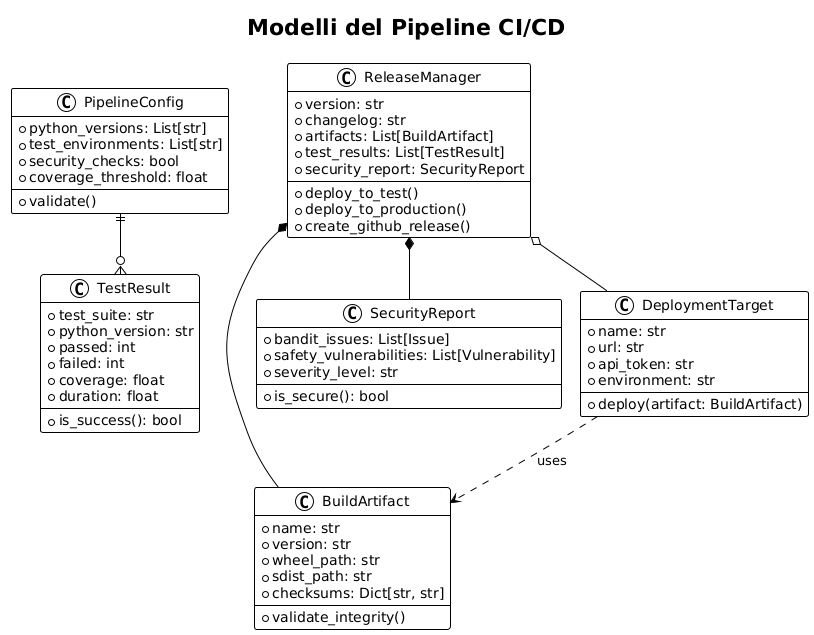
Oggetti e modelli della pipeline
Diagramma delle classi - Modelli CI/CD
Configurazione dei Segreti
Perché il pipeline funzioni, dovete configurare i seguenti segreti in GitHub :
Segreti GitHub Actions
# Dans Settings > Secrets and variables > Actions

# Token PyPI pour la production
PYPI_API_TOKEN=pypi-...

# Token Test PyPI pour les pré-releases
TEST_PYPI_API_TOKEN=pypi-...

# Token GitHub pour créer les releases
GITHUB_TOKEN=(automatiquement fourni)

# Token Codecov (optionnel)
CODECOV_TOKEN=...
Generazione dei token PyPI
# 1. Créer un compte sur PyPI et Test PyPI
# 2. Aller dans Account Settings > API tokens
# 3. Créer un token avec scope "Entire account" ou spécifique au projet
# 4. Format du token : pypi-AgEIcHlwaS5vcmc...
Scripts di sviluppo locale
Per facilitare lo sviluppo, crea script utilitari :
Makefile
.PHONY: install test lint format security build clean release-test release-prod

install:
	pip install -e ".[dev]"

test:
	pytest tests/ -v --cov=src/playlist_downloader

lint:
	flake8 src tests
	mypy src

format:
	black src tests

security:
	bandit -r src/
	safety check

build:
	python -m build
	twine check dist/*

clean:
	rm -rf build/ dist/ *.egg-info/
	find . -type d -name __pycache__ -delete
	find . -name "*.pyc" -delete

release-test: clean build
	twine upload --repository testpypi dist/*

release-prod: clean build
	twine upload dist/*

pre-commit: format lint test security
	@echo "✅ Prêt pour commit"
Script di versione
#!/usr/bin/env python3
"""Script pour gérer les versions du projet."""

import sys
import subprocess
from pathlib import Path

def get_current_version():
    """Récupère la version actuelle depuis git."""
    try:
        result = subprocess.run(
            ["git", "describe", "--tags", "--abbrev=0"],
            capture_output=True,
            text=True,
            check=True
        )
        return result.stdout.strip()
    except subprocess.CalledProcessError:
        return "0.0.0"

def create_version_tag(version, message=None):
    """Crée un tag de version."""
    if not version.startswith('v'):
        version = f'v{version}'

    tag_message = message or f"Release {version}"

    subprocess.run(["git", "tag", "-a", version, "-m", tag_message], check=True)
    print(f"✅ Tag {version} créé")

    # Push le tag
    subprocess.run(["git", "push", "origin", version], check=True)
    print(f"✅ Tag {version} poussé vers origin")

if __name__ == "__main__":
    if len(sys.argv) < 2:
        current = get_current_version()
        print(f"Version actuelle: {current}")
        print("Usage: python version.py <new_version> [message]")
        sys.exit(1)

    new_version = sys.argv[1]
    message = sys.argv[2] if len(sys.argv) > 2 else None

    create_version_tag(new_version, message)
Buone Pratiche e Raccomandazioni
Versionamento semantico
Utilizzare il versionamento semantico (SemVer) :
-
MAJOR.MINOR.PATCH(ex: 1.2.3) -
MAJOR: modifiche incompatibili -
MINOR: nuove funzionalità compatibili -
`PATCH`correzioni di bug compatibili
Strategia di ramificazione
main          ──●──●──●──●──●────●── (releases stables)
               /       /          /
develop    ──●──●──●──●──●──●──●──●── (développement)
            /     /        /
feature/xxx  ●──●──●──●──●──/ (fonctionnalités)
Test e Copertura
-
Copertura minima del codice: 85%
-
test unitari per la logica di business
-
Test di integrazione per gli adattatori
-
Test end-to-end per le CLI
Sicurezza
-
Scansione automatica delle dipendenze (Safety)
-
Analisi statica del codice (Bandit)
-
Segreti mai nel codice
-
Utilizzo di token PyPI specifici
Monitoraggio e Osservabilità
Metriche di Pipeline
# .github/workflows/metrics.yml
name: Pipeline Metrics

on:
  workflow_run:
    workflows: ["CI", "Release"]
    types: [completed]

jobs:
  metrics:
    runs-on: ubuntu-latest
    steps:
    - name: Collect metrics
      run: |
        echo "Pipeline: ${{ github.event.workflow_run.name }}"
        echo "Status: ${{ github.event.workflow_run.conclusion }}"
        echo "Duration: ${{ github.event.workflow_run.updated_at - github.event.workflow_run.created_at }}"
        # Envoyer vers système de monitoring
Notifiche
# Ajout dans les workflows pour notifications
- name: Notify on failure
  if: failure()
  uses: 8398a7/action-slack@v3
  with:
    status: failure
    text: "❌ Pipeline failed for ${{ github.repository }}"
  env:
    SLACK_WEBHOOK_URL: ${{ secrets.SLACK_WEBHOOK }}
Conclusione
Questa pipeline CI/CD completa per Python offre:
-
Automazione completa: dalla validazione del codice alla pubblicazione
-
Sicurezzascansioni automatiche e gestione sicura dei segreti
-
Qualità: test multi-version, linting e copertura del codice
-
Affidabilità: distribuzione graduale tramite Test PyPI
-
Tracciabilitàartefatti, rapporti e releases GitHub
L’adozione di queste pratiche garantisce un processo di consegna robusto e professionale per le tue applicazioni CLI Python, facilitando la manutenzione e l’evoluzione dei tuoi progetti nel lungo termine.
Articoli correlati
14 May 2026